Sentinel Core
In testing on Google Play · free & open source RigHelm for Android

Your FTDX3000, in your pocket.

RigHelm for Android is a remote for RigHelm. Leave RigHelm running on the computer the radio is plugged into, and tune, listen, talk and send CW from anywhere in the house. The phone finds the station by itself.

Test it on Google Play Screenshots Source on GitHub
RigHelm for Android is still in testing. It's the Android twin of RigHelm for iPhone, with the same protocol code, the same features and the same safety rules. On Android it has been checked against RigHelm's built-in FTDX3000 simulator so far. You can try it through Google Play. If something doesn't work, tell me or open an issue.
What it does

The radio in the shack, the controls in your hand.

Finds your station

Open the app and RigHelm stations on your Wi-Fi are listed, with whether the radio is on and whether they accept a microphone. Or type an address.

Tune like a radio

Turn the helm wheel, drag across the frequency, step with the arrows or type a frequency in. Bands, modes, VFO A/B, split, lock and the tuner are one tap away.

Listen anywhere

The radio's receive audio plays on the phone, smoothed out for Wi-Fi, and keeps playing with the screen off or in another app. A notification lets you disconnect from anywhere.

Talk through the phone

Switch to PHONE MIC and hold the big button to talk. The radio's MIC SEL menus go to USB while you use it and back to what they were when you're done.

Send CW from the phone

Switch to PHONE KEY and the bottom of the screen becomes iambic paddles: left for dit, right for dah, both thumbs to squeeze. Straight key, iambic A or B, typed text and a sidetone on the phone.

Every control

AF/RF gain, squelch, AGC, preamp, attenuator, roofing, width, IF shift, noise blanker, DNR, notch, contour, power, mic gain, processor, VOX, monitor, clarifier and CW keyer.

Safe to carry around

Transmit stays locked until you allow it in Settings. The phone lets go of the radio when it goes in your pocket, when a phone call comes in or after a time-out, and the CW key goes back to the radio's own key when it's not in use.
Screenshots

What it looks like.

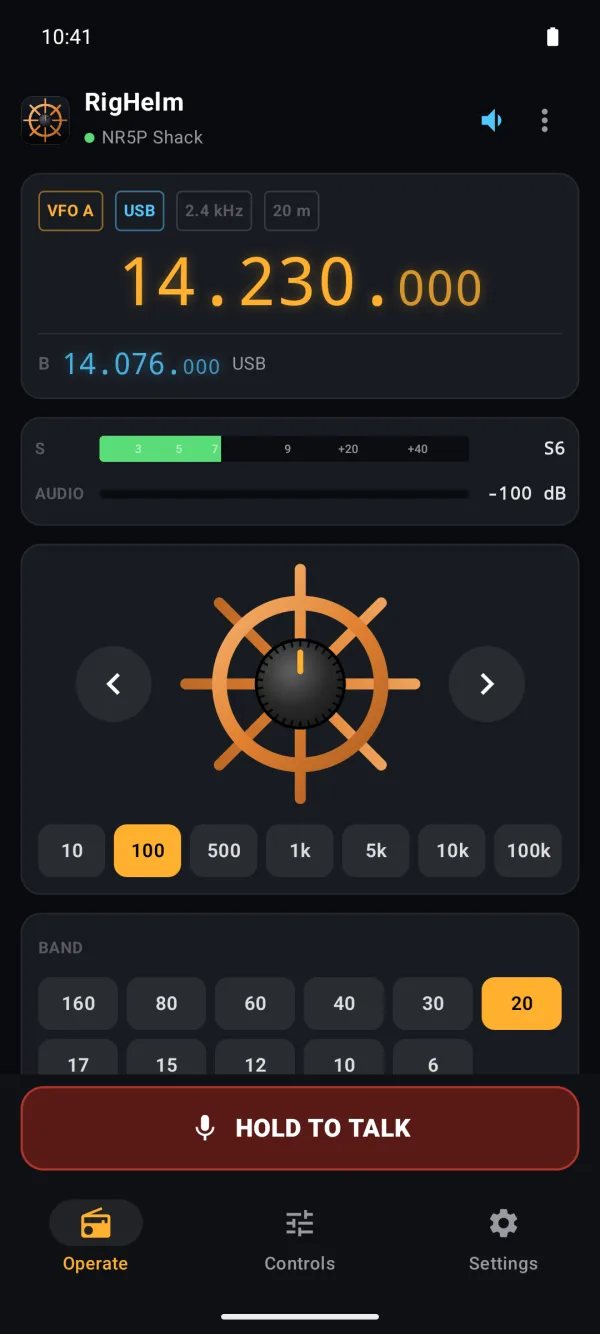
RigHelm for Android's Operate page: 14.230.000 USB on 20 m, the S-meter at S6, receive audio level, the helm-wheel tuning knob and step sizes, and the hold-to-talk button
Operate. Frequency, S-meter, audio and the helm-wheel knob.
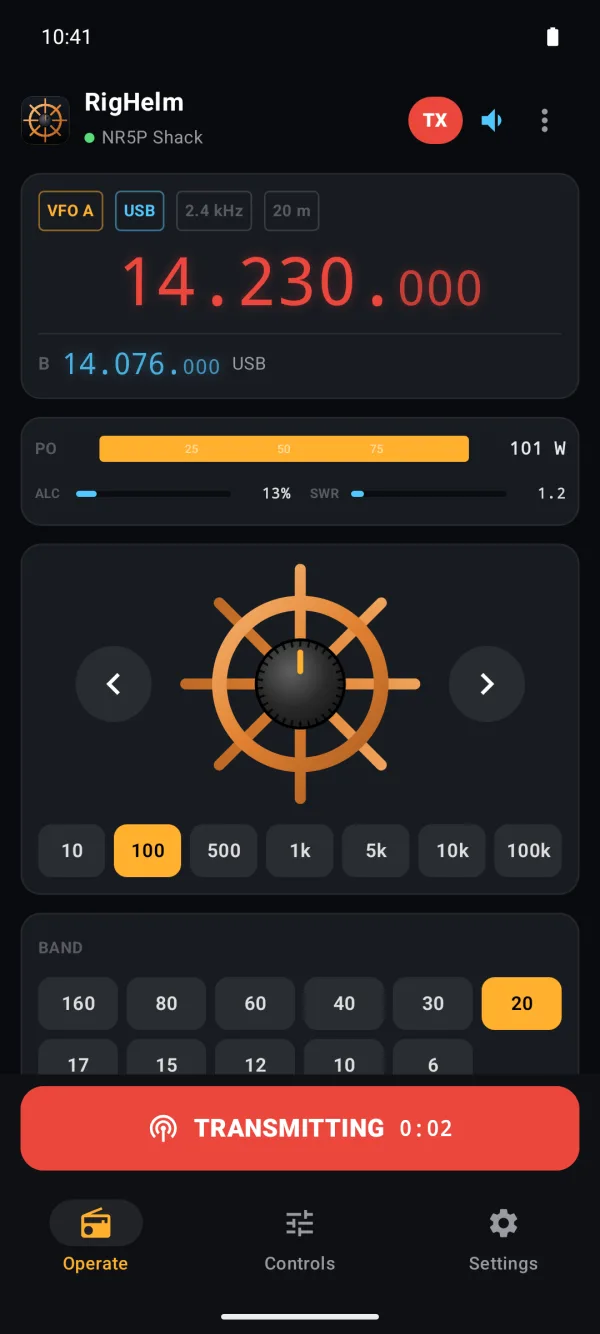
Transmitting: the frequency turns red, a TX badge shows, the power meter takes the S-meter's place with ALC and SWR under it, and the talk button shows TRANSMITTING with a timer
Transmitting. Power, ALC and SWR while you talk.
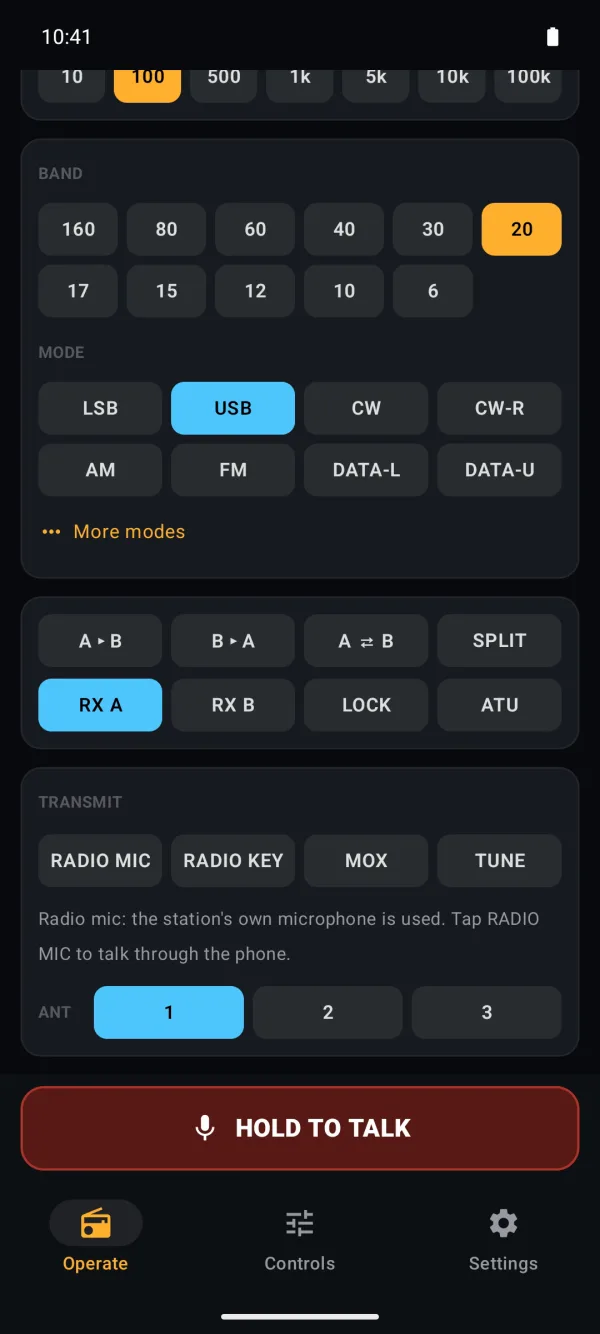
Band and mode buttons, VFO A/B, split, lock and ATU, and the transmit section with the RADIO MIC and RADIO KEY switches, MOX, TUNE and antenna
Bands & modes. VFOs, split, tuner, mic and key switches.
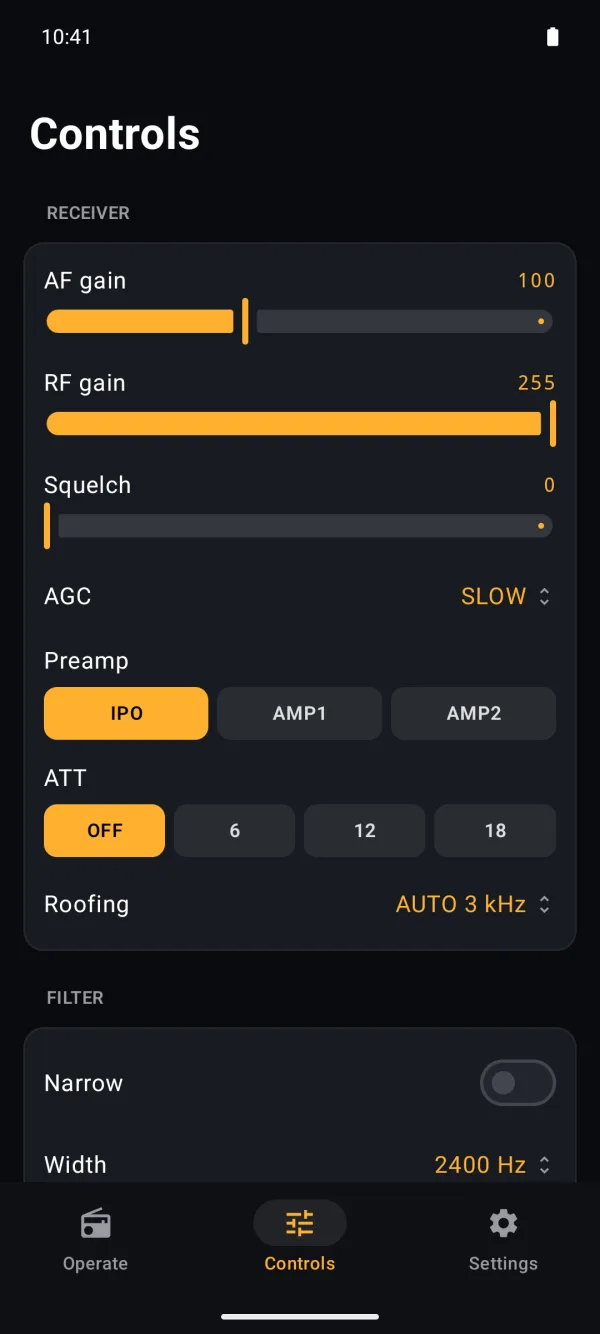
The Controls page: AF gain, RF gain, squelch, AGC, preamp, attenuator and roofing filter
Controls. Receiver, filter, DSP, transmitter and CW.

Screenshots from the Android emulator (Pixel 8), connected to RigHelm with its built-in FTDX3000 simulator.

How it connects

Phone, RigHelm, radio.

Android phone (Wi-Fi)→RigHelm on the radio's computer→FTDX3000
On the radio's computerRun RigHelm and open Remote (LAN) → Let other computers use this radio. Set a password so the phone may transmit, and turn on Accept microphone audio for transmit to talk through the phone.
On the phoneOpen the app and the station shows up under On your network; tap it and enter the password. Allow notifications so the app can keep the station connected and playing in the background.
Shares the radioWSJT-X, your logger and other remote computers keep working while the phone is connected. RigHelm owns the radio and shares it with everyone.
At home, not across the internetIt's made for your home network, like RigHelm's own LAN remote. The password is never sent in clear, but the audio and control traffic isn't encrypted.
Get it · in testing

Not in the Play Store yet. Test it through Google Play.

Latest: RigHelm for Android v1.1.1 (testing) · CW key, smoother receive audio, instant push-to-talk

The test build comes straight from Google Play, and updates arrive by themselves like any other app. Testing is by invitation for now, so it takes two steps. It needs Android 8.0 or later.

1. Ask to joinEmail me the Google account (Gmail address) your phone uses for the Play Store, and I'll add you to the testers.
2. Install from Google PlayOnce you're added, open the test link on your phone, accept the invitation to test, then follow the link to Google Play and install. Play shows it as com.righelm.android (unreviewed) until it's listed.

If Google Play says the app isn't available or the item wasn't found, you're probably not on the tester list yet, or the Play Store app is signed in with a different Google account. Switch accounts from your picture in the Play Store, or email me.

Or build it yourself

You can also build it with Android Studio (free) and install it on your own phone over USB. Open the folder in Android Studio and run the app configuration, or from a terminal:

git clone https://github.com/NR5P/righelm-android.git
cd righelm-android && ./gradlew :app:installDebug

Open source

All of the app's code is on GitHub at github.com/NR5P/righelm-android. It's free software under the GNU GPL v3, like RigHelm.

Source code · README & setup · Report a problem · License (GPL v3) · RigHelm for iPhone · RigHelm for Windows, Mac & Linux

Support on PayPal RigHelm is free and made in my spare time. If it's useful to you, a tip helps keep it going.